Meta's Push Delivery Feature: What It Is and How to Use It
Why it matters:
Push Delivery addresses a major challenge in Meta ads today: new creatives not receiving spend. Rather than depending on the algorithm to eventually try out new ads, you can now ensure delivery, speed up learning, and maintain momentum when updating campaigns without starting the learning phase over. This translates to quicker iterations, faster validation of concepts, and reduced time lost waiting for the system to recognize new creatives.
If you've ever added a fresh creative to a live campaign only to watch it sit with nearly zero spend while your older ads eat the budget, this one's for you.
Meta is rolling out a new feature called Push Delivery, and it directly addresses one of the most frustrating parts of managing creative at scale.
What Is Push Delivery?
When you add a new ad to an existing campaign, Meta's delivery system defaults to what it knows. In most Meta ad accounts most of the time, established, proven ads get the lion's share of budget because the algorithm has data on them to know who to target, how to target them, when to target them, and with what creative to show them. Your new creative, no matter how good it is, can sit in the dark for days or never get enough spend to prove its value at all.
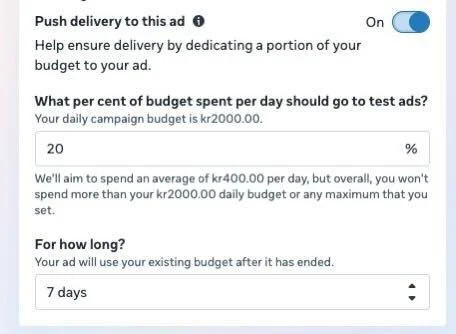
Push Delivery gives you a way to force the issue. When creating a new ad inside an existing campaign, you'll find the toggle under "Show more settings." Turn it on, set what percentage of your existing daily budget you want to allocate to that ad, and choose a duration of up to 7 days. Meta will then prioritize spend on that creative for however long you set.
Once the push period ends, the ad keeps running, and critically, it retains whatever learnings it accumulated. This means you avoid the learning phase reset that usually happens when you move an ad from a sandbox testing campaign into your main campaign (BAU). That alone is a meaningful win.
When Does It Roll Out?
Push Delivery is currently in a phased rollout with no allow list, so you either have it or you wait. Rough timeline from Meta:
March/April 2026: Roughly 5% of accounts have been given access
May 25, 2026: Expected to reach 50% of advertisers
July 10, 2026: Expected to reach 100% of advertisers
If you don't have it yet, it's coming. Keep an eye out for the toggle the next time you're setting up a new ad.
Push Delivery vs. Creative Testing
In a creative A/B test setup, this kind of feature to be able to force spend does already exist, but only within the A/B testing framework. So why is Push Delivery necessary, and a HUGE deal for Meta advertisers? These are two different tools for two different jobs, and it's worth being clear on which to use when.
Creative Testing is built for comparison. You can test up to five creative variants against each other and get data on which performs best. Use it when you want directional insight across multiple options.
Push Delivery is built for delivery assurance. It is not a testing tool in the traditional sense. It is for when you have one specific new creative and you simply want to make sure it gets enough spend to either prove or disprove itself. Combating creative fatigue, launching seasonal assets, refreshing a tired campaign, these are the situations where Push Delivery fits cleanly.
How to Set It Up
The setup is straightforward once you have access:
Open an existing campaign and create a new ad
Click "Show more settings"
Toggle on "Push delivery to this ad"
Set your budget percentage and duration (up to 7 days)
The interface shows the percentage field and the duration dropdown clearly. At 20% of a $2,000 daily budget, for example, Meta would show an estimated average daily spend of $400 toward that specific ad.
Nerdy or not, this stuff is exactly what we’re discussing every day in the Foxwell Founders Membership. Interested in what we’re doing over there? We’d love to have you!