The Google Ads BFCM Checklist: 18 Jobs to Do Before Cyber Monday
Why It Matters
Most Black Friday losses in Google Ads are set up in October and only discovered on the morning of the sale. Tracking that double-counts discounted orders, a Merchant Center promotion stuck in review, or an automated rule that fires two hours late can burn through peak-week budget before anyone notices. This checklist puts the prep in order, starting six weeks out, from break-even ROAS on discounted margin and tracking tests to branded search protection, paused BFCM assets, and a clean revert plan after Cyber Monday. Doing the unglamorous setup now means Smart Bidding gets clean signals when traffic is most expensive.
Who This Is For
Built for Founders members managing Google Ads for Shopify or other ecommerce accounts heading into BFCM, especially media buyers and agency teams who want a week-by-week prep sequence rather than a last-minute scramble. If you’re running Shopping, Performance Max, and branded search into peak season, this is your pre-flight list.
A lot of Black Friday losses in Google Ads are set up in October and not found until Black Friday morning. Those come from mistakes like purchase tracking that double-counts discounted orders, a Merchant Center promotion still sitting in review, or an automated rule that fires two hours late.
To cut down on those missteps, these are the 18 jobs I work through on a Shopify account starting six weeks from Black Friday, in the order they need doing.
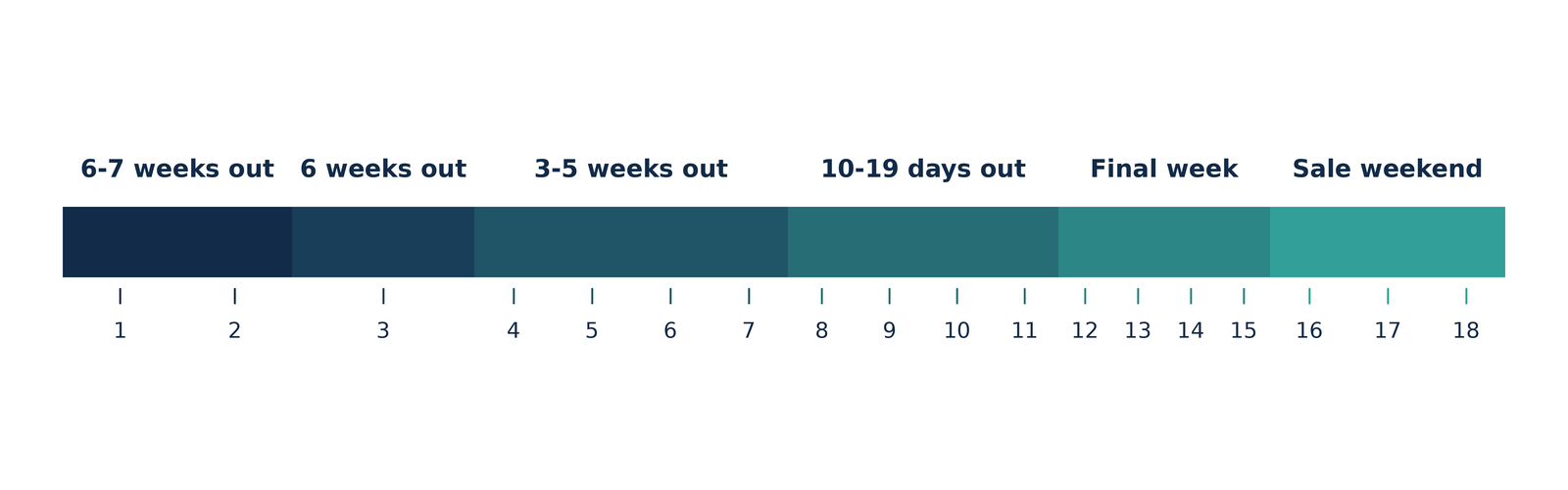
Six to seven weeks out
1. Pull last year's BFCM numbers by day and hour. Run campaign by day in the Report editor and note CPC, conversion rate, AOV and impression share lost to budget for each day of Black Friday week. Hour of day shows when demand peaked. Write down what broke, too.
2. Work out break-even ROAS on the discounted margin. If 40% margin is left after the discount, break-even ROAS is 2.5. Everyday margin is the wrong input once 30% comes off the price. Budget is then roughly the revenue target divided by the ROAS you expect.
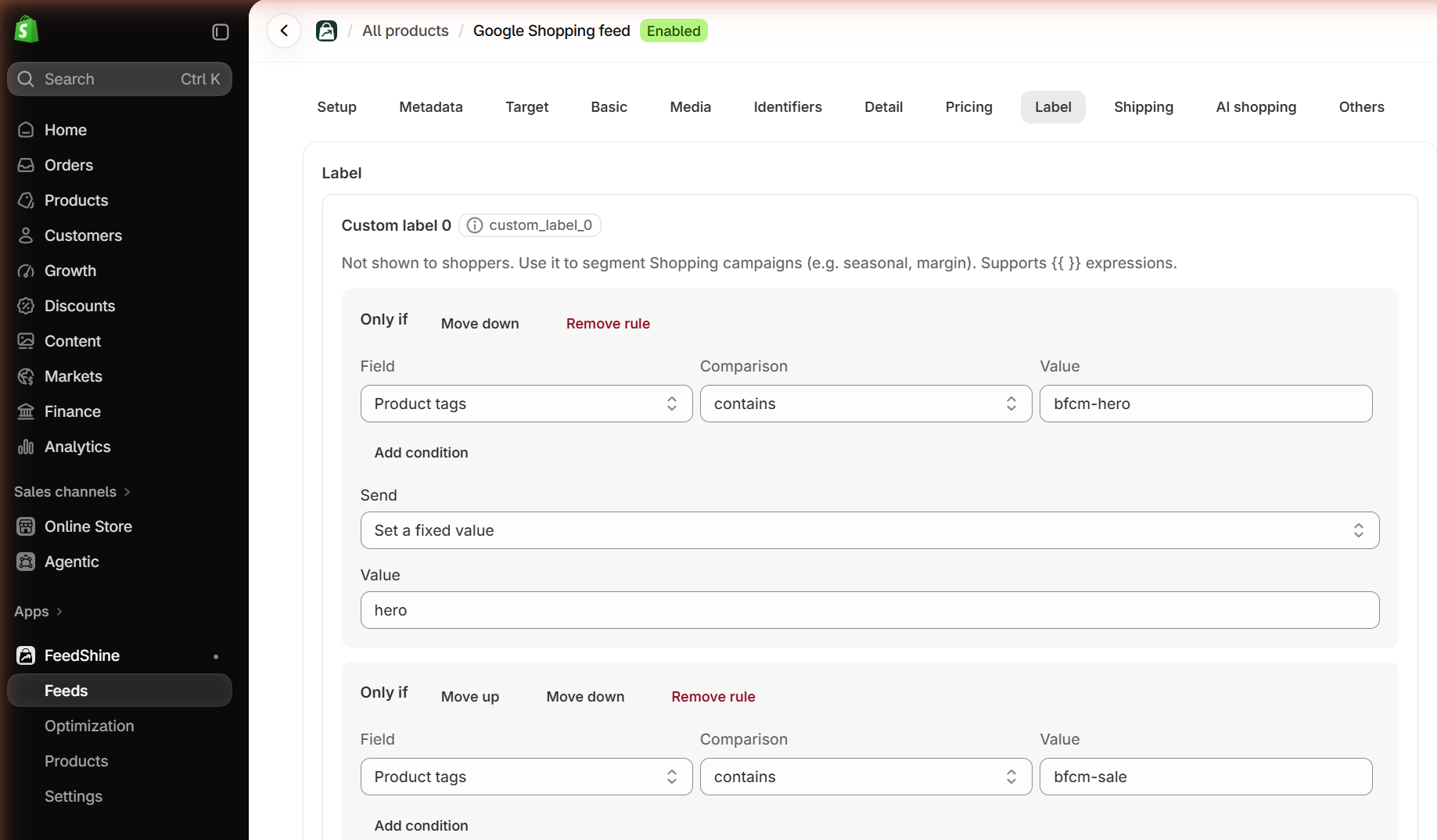
3. Pick the hero products and label them. A handful of products usually drive most Shopping and Performance Max results. Choose on margin, price competitiveness and stock depth, then give each SKU a role (hero, sale, clearance, excluded) in custom_label_0 so campaigns can split on it.
In FeedShine, the product feed app for Shopify, you can do this quickly with a simple rule for products tagged in Shopify. You can also connect Claude or ChatGPT through its MCP and re-label hundreds of products in one request.
Foxwell Founders is where 600+ agency owners, brand founders, and in-house marketers swap what’s actually working, spending a combined $500M+ on ads every month. Get 24/7 Slack access, weekly live calls, and monthly ad account audits.
Six weeks out
4. Place a test order with a discount code. Purchase should fire once, with the post-discount value and a transaction ID, and it should be the only primary conversion. Compare Google Ads conversions with Shopify orders for the last 30 days, since Smart Bidding spends the sale week's budget on these numbers. Then agree on a code freeze with your developer from seven days out until the sale ends.
5. Switch off auto-applied recommendations. Auto-apply can change bid strategies, targets, keywords and ads without asking, sale week included.
6. Make the clocks agree. Google Ads, Merchant Center and Shopify should share a time zone, or promotions switch on at the wrong hour. A standard account's time zone can't be changed, so if yours differs from the store's, schedule everything in account time.
7. Check billing covers peak days. Google can spend up to twice the average daily budget on a given day. Add a backup card and confirm the limit covers that.
Three to five weeks out
8. Protect branded search. These searchers already want your deal. Add "[brand] black friday", "[brand] sale" and "[brand] discount code" as phrase and exact match, point them at the sale page, and set the budget so it's never limited.
9. Block generic Black Friday searches, then buy them back on warm audiences. Add [black friday], [black friday deals] and [cyber monday] as exact-match negatives on non-brand prospecting, plus plurals, since negatives ignore close variants. A separate RLSA campaign then targets those same terms for site visitors and Customer Match lists only. Upload those lists now, because matching can take up to 48 hours.
10. Build BFCM Performance Max asset groups, paused. The listing group holds hero products only. Add sale creative, search themes like "black friday [category]" and customer lists as signals, and check final URL expansion so traffic doesn't land on pages with no sale. Switch them on 10 to 15 days out so they aren't starting cold.
11. Publish landing pages before you submit ads. A page has to be complete for the ad to be reviewed, so build it now and hide it from navigation. This late, keep the work to matching the ad's offer above the fold on mobile, because the bigger landing page fixes before Q4 should already be shipped. A 404 after the sale gets ads disapproved, so plan the redirect now.
No spam. Just signal.
Tactics, trends, and takeaways you can use immediately.
10 to 19 days out
12. Duplicate your best RSAs into BFCM versions. Edit the offer, event and deadline into a copy of the top ad in each ad group, label each set by window and upload them paused, since paused ads still go through review. Add an unpinned countdown such as {COUNTDOWN(2026-11-30 23:59:00,5)}. One headline should qualify the click with a price point, because deal hunters who were never going to buy are among the worst Google Ads budget killers for Shopify stores.
13. Set up promotion assets and Merchant Center promotions. Promotion assets with a Black Friday or Cyber Monday occasion only show between October 15 and December 15. In Merchant Center, use a title that explains the offer ("30% off sitewide with code SAVE30") and make sure the code works from the start time. Google asks for 24 hours' notice. Give it a week in case of a disapproval.
14. Put the sale price in the feed, never the title. Use sale_price with sale_price_effective_date and switch the site and feed together. Google's product title rules ban promotional text, so "Black Friday" in a title invites disapprovals.

15. Don't trust a rule with midnight. Automated rules can run up to two hours late. Promotion assets, sitelinks and Merchant Center promotions should use their own start and end dates instead. For the ad swap, someone switches manually and the rule is the backup.
Final week
16. Record your settings, then set peak targets. Export every budget, target, and bid first so the revert is quick. Loosening tROAS by 10 to 20% is reasonable if break-even allows. Google says Smart Bidding already manages seasonal events, so add a seasonality adjustment only if your offer will lift conversion rate well past a normal Black Friday. Keep it to 1 to 7 days and stay conservative, since overestimating makes Smart Bidding overbid.
Sale weekend
17. Judge each day on Shopify, not Google Ads. Same-day conversion value is incomplete, which is why judging ROAS too early leads to bad cuts. If Google Ads conversions drop while Shopify orders hold, suspect tracking first. From Saturday, shift budget toward brand, RLSA and customer lists in 15 to 25% steps, and leave the account structure alone until Tuesday.
After Cyber Monday
18. Revert everything, then report. Pause BFCM ads and asset groups, restore evergreen, end rules and feed changes, and reset budgets and targets to the numbers you recorded. If tracking broke mid-sale, add the outage as a data exclusion so Smart Bidding doesn't learn from it. Wait seven days for delayed conversions before you compare the weekend with last year.
All the best with this year's BFCM!
About the author
Joshua Uebergang wrote Google Shopping for Shopify: The Definitive Guide and has been running Google Ads for ecom brands at Digital Darts since 2015. His team also manages FeedShine, which creates optimized Google Shopping feeds for Shopify stores in minutes.