Your Meta Ads Are Only as Good as Your Tracking
Why It Matters
The performance of your Meta ads hinges on the quality of your tracking. If your data is inaccurate, it can lead to poor optimization and misguided decisions based on faulty insights. This means tracking—including Pixel, CAPI, and EMQ—should be prioritized as a key growth driver rather than just an afterthought. With clean data, you'll see improved optimization, lower cost per acquisition, and better overall performance. Remember, if your data inputs are flawed, no amount of creative or budgeting adjustments will help. So, before changing your ads or strategy, make sure your tracking is solid; it's essential for success.
Why your Meta performance lives or dies by the quality of your tracking and how to finally fix it.
Most brands only look at their tracking when something breaks. But as Brett Fish (Tag Hero) explains in this episode of Scalability School, your tracking setup is actually one of the biggest performance levers inside your Meta account and bigger than creative, bigger than account structure, and absolutely bigger than whatever “hack” is trending on Twitter today. Bad tracking isn’t just annoying. It quietly throttles your optimization, misattributes conversions, feeds Meta incomplete signals, and forces media buyers to rebuild creative for a problem that isn’t creative.
Brett walks us through how he went from old-school media buying → early Facebook ads → becoming one of the most specialized tracking experts in the industry through Tag Hero. And he explains, in plain English, why your pixel, CAPI, and EMQ are likely lying to you and how to finally get the truth.
Below is the full breakdown.
Why Data Quality Controls Your Meta Performance
You can have the best offer, the strongest creative, and a completely dialed-in account structure… But if the platform isn’t receiving clean, consistent, deduplicated data?
Meta’s algorithm cannot optimize.
“Good data in → good output. Garbage in → garbage out.”
That’s the game.
Most advertisers think tracking is “set it and forget it.” Until suddenly: conversions drop, CPA spikes, credit card gets maxed out, Shopify numbers don’t match Ads Manager, and panic ensues.
This episode is your insurance policy before that happens.
When Shopify’s Default Tracking Is Enough And When It’s Not
The first big myth: There’s nothing “wrong” with Shopify’s default Facebook & Instagram Sales Channel.
For 80–90% of brands, it’s totally fine.
It gives you:
Pixel events
Conversion API (CAPI) server-side events
Automatic deduplication
Basic parameter passing
A fast, easy setup that eliminates most user error
You should absolutely use it if:
✔ Your brand is doing normal DTC volume
✔ You aren't running a complex multi-step or custom funnel
✔ You don’t want to maintain custom code
✔ You want reliable CAPI without engineering resources
Where it doesn’t work:
Complex funnels (quizzes, gated flows, custom events)
Heavy technical customization
Tracking enrichment or fingerprinting
Very high spend (where tiny data gains produce big revenue swings)
If you’re spending six figures+ on Meta each month, it’s probably time to consider graduating into something heavier like Elevar, Blotout, or EdgeTag — not because they “fix” Shopify, but because they add incremental, enriched data that can improve upper-funnel optimization.
Stay ahead of the game with our newsletter! From blogs to courses, we’re here to help you grow smarter, not harder.CAPI 101: The Part Most Advertisers Misunderstand
CAPI isn’t a “better pixel.”
It’s another path to send the exact same event to Meta.
Pixel = browser
CAPI = your server talking directly to Meta’s servers
Why you need both:
Pixel events break constantly (ad blockers, slow browsers, JS errors)
CAPI backstops those missed events
Running both provides 8–13% more events captured (Meta’s number)
The critical thing: Pixel + CAPI MUST deduplicate by using the same event ID
Otherwise Meta thinks one purchase = two purchases. (Yes, this happens all the time.)
How to check:
Go to Events Manager → Overview → Connection Method → “Multiple”
Then inspect purchase events for pixel + server parity.
If you only remember one thing about CAPI, remember this: Its job is missing-event insurance — not magic-performance insurance.
Event Match Quality (EMQ): What the Numbers Actually Mean
EMQ is Meta’s way of telling you: “How confidently can we match this website action to a Meta user?”
Scores are 0–10. But here's the truth: Real 10/10 scores basically don’t exist
Even perfect setups top out around 9.2–9.4.
Here’s what “good” looks like, based on thousands of accounts Brett has audited:
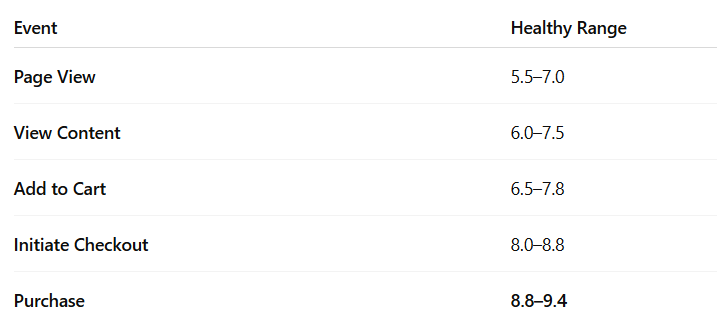
Anything below an 8 on Purchase is a red flag.
But here’s what really matters → the inputs behind EMQ:
The 2 Most Important Match Keys
These matter more than anything:
Email
FBC — Facebook Click ID
FBC is the single most deterministic parameter Meta has.
It literally ties “this person clicked this ad at this time” to “this person purchased.”
You won’t see 100% FBC because not all purchases come from Meta ads and that’s normal.
If your FBC % roughly aligns with your Meta-attributed purchase share, you’re fine.
The Silent EMQ Killer: Event Setup Tool
Brett calls it the “silent killer” — and it’s everywhere.
Inside Events Manager → Settings → Event Setup Tool, you’ll often find:
Old manual events
Duplicated events
Add to Cart or Purchase firing from random buttons
Events created by a past intern, developer, or freelancer
These override normal events and cause total chaos.
Delete anything in that tool unless you intentionally created it.
Advanced Optimization: Should You Optimize for Quiz Completions or New Customers?
Short answer:
Test it — but don’t expect miracles.
Why:
Meta does not have a native “new customer” dimension
A “New Customer Purchase” custom event is just a subset of your real purchase event
Meta may not optimize differently for it
The best NC lever is usually exclusions, not optimization
For mid-funnel events (quiz completions, PDP views, second-click view content):
✔ Worth testing
✔ Often helps high-spend accounts
✔ Useful for breaking out of a saturated audience
✔ Useful when you need extra signal volume
✔ Useful in high-ACV funnels with multiple steps
But for 99% of brands?
Optimize for Purchase, exclude aggressively, and keep it simple.
The Health & Wellness Flag: The Silent Ad Account Killer
This might be the most important part of the episode.
Meta has quietly begun categorizing domains into:
Health & Wellness – Condition
Health & Wellness – Other
Once your domain is categorized:
You may lose all your lower-funnel events.
Add to Cart
Initiate Checkout
Purchase
…all blocked from optimization.
Or you may be placed into Core Setup, which:
Restricts parameters
Blocks sensitive data
And (anecdotally) causes CPA spikes almost instantly
This isn’t speculation It’s happening widely, including to brands that:
Sell bath bombs
Sell supplements
Sell topical skincare
Mention anxiety, sleep, pain, digestion, or “symptoms”
Have user-generated reviews containing health claims
There is no guaranteed fix, and Meta has provided almost no clarity.
The only compliant options:
✔ Scrub your site and request manual review
✔ Switch optimization to View Content (not ideal)
✔ Or explore technical workarounds (Tag Hero can help privately)
If you’re affected, contact Brett.
It’s absolutely real, widespread, and materially harmful to performance.
When Tracking Isn’t the Problem, But You Think It Is
One of Brett’s biggest goals:
Helping teams confidently say:
“This is not a tracking issue, this is a creative/offer/auction issue.”
Because too many brands:
Rebuild creative unnecessarily
Panic-change budgets
Blame attribution
Or assume their pixel is broken
…when the real issue is totally separate.
A clean tracking audit gives your media team the confidence to know: “If performance tanks tomorrow, tracking is not the culprit."
That peace of mind alone is ROI positive.